View and download full-size, high-definition Instagram profile pictures (DP) online. Simply paste the username or profile URL.
Instagram profile pictures are often too small to view clearly inside the app. Whether you want to see a full-size profile photo or save it for later, our Instagram Profile Picture Downloader makes the process quick and easy. Simply enter the public Instagram profile, and start your Instagram Profile Picture Download in just a few seconds.
Whether you want to download Instagram Profile Pictures for offline use or need a trusted Insta Profile Picture Downloader, our tool lets you save public profile photos in the best available quality. It works on Android, iPhone, Windows, Mac, and all modern browsers without requiring an app, account, or Instagram login.
Open Instagram and visit the public profile whose picture you want to download. Copy the profile URL.
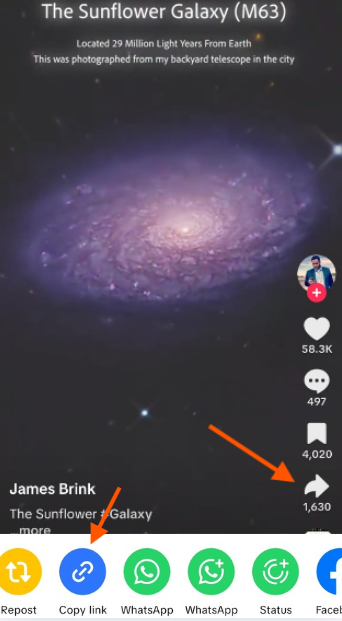
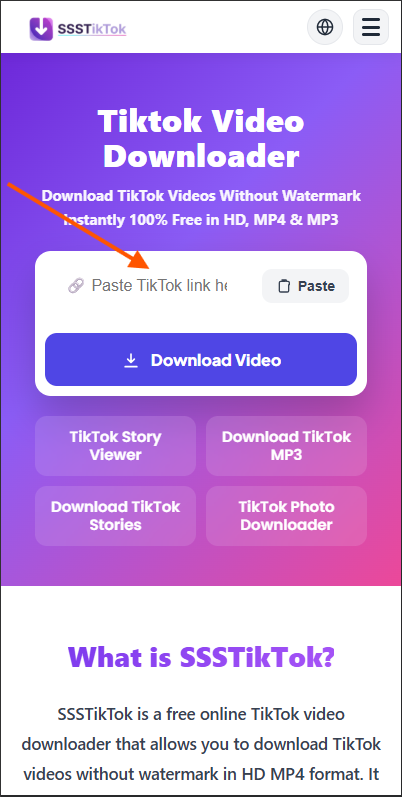
Paste the copied profile link into our Instagram Profile Picture Downloader. The tool will automatically find the profile picture.
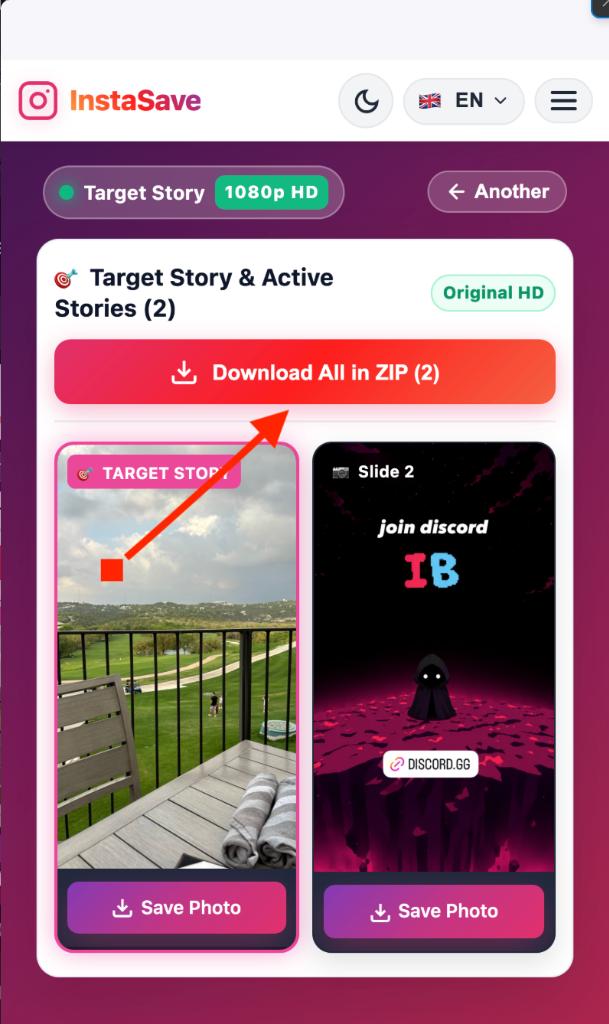
Click Download to save the profile picture in the highest quality available to your device.
Our Instagram Profile Picture Downloader gives you everything you need for a fast, secure, and hassle-free Instagram Profile Picture Download. View and save public profile pictures in high quality without installing an app or signing in.
View and download Instagram Profile Pictures in the best quality available. Whether you need an Insta Profile Picture Download HD or a clear profile image for offline viewing, our tool delivers sharp and high-quality results.
Instagram usually displays profile pictures in a small size. Our Profile Picture Downloader Instagram helps you view the full-size profile image before downloading it.
Your privacy matters. Our Instagram Profile Picture Downloader never asks for your Instagram username or password. We only process public profile information and never collect unnecessary personal data.
Use our Online Insta dp Downloader on Android, iPhone, Windows, Mac, Linux, tablets, or any modern browser. No installation or browser extension is required.
Need more than one Insta DP Download? Download as many public Instagram profile pictures as you want without limits, subscriptions, or hidden fees.
Everything works directly in your browser. Simply paste the public profile link and complete your Insta Profile Image Download in just a few clicks.
Our Instagram Profile Picture Downloader only processes public profile information to generate your Instagram Profile Picture Download. We never store downloaded images or collect unnecessary personal information. Download profile pictures safely while respecting the privacy and rights of the original account owner.
| Features | InstaSave | Others | |
|---|---|---|---|
| Direct 1080p Full HD Downloads | ✓ | ✕ | ✕ |
| Clean (No Watermark on Media) | ✓ | ✓ | ✕ |
| 100% Anonymous Viewing & Saving | ✓ | ✓ | ✕ |
| Full-Size Profile Picture (HD DP) | ✓ | ✕ | ✕ |
| Story Highlights Album Downloader | ✓ | ✕ | ✕ |
| Original Audio & MP3 Extraction | ✓ | ✕ | ✕ |
| No Account Login Required | ✓ | ✓ | ✕ |
| 100% Free & Unlimited Access | ✓ | ✕ | ✓ |
Need something more than an Instagram Video Downloader? Explore our free Instagram tools to download, view, and save different types of Instagram content in just a few clicks.
Download trending reels with high quality audio in MP4 format.
Explore ToolExtract background songs and original voice tracks in MP3 format.
Explore ToolFind answers to the most common questions about using InstaSave downloader.
Copy the public Instagram profile link, paste it into our Instagram Profile Picture Downloader, and click Download. Your profile picture will be ready in just a few seconds.
Yes. Our Instagram Profile Picture Download HD tool saves profile pictures in the best quality available from the public Instagram profile.
Yes. Our tool is completely free to use. There are no hidden fees, subscriptions, or download limits.
No. You don't need to sign in or provide your Instagram username or password. Simply paste the public profile link and download.
Yes. Our tool also works as an Insta DP Downloader, allowing you to view and save public Instagram profile pictures in full size.
Yes. Our Online Instagram Profile Picture Downloader works on Android, iPhone, Windows, Mac, Linux, tablets, and all modern web browsers.
No. For privacy reasons, our tool only supports publicly available Instagram profiles.
This usually happens if the profile link is incorrect, the account is private, or the profile has been removed. Check the link and try again.
Yes. We never ask for your Instagram login details or collect unnecessary personal information. Your privacy and security are always protected.
You should only download profile pictures that you have permission to use. Always respect Instagram's terms and the rights of the original account owner.
Your downloaded image is usually saved to your browser's Downloads folder. On mobile devices, it may also appear in your Gallery, Photos, or Files app.