Instagram Thumbnail Downloader

Extract and download original high-resolution cover thumbnail posters from Instagram Reels, Videos, and IGTV posts.

What is Instagram Thumbnail Download

Every Instagram video, Reel, Story, and IGTV post has a thumbnail that catches people's attention before they press play. If you'd like to save that preview image, our Instagram Thumbnail Downloader makes it quick and easy. Simply copy the public Instagram link, paste it into the downloader above, and start your Instagram Thumbnail Download in just a few clicks.

Whether you want to save a Reel cover, a video preview, or keep an Insta Thumbnail for inspiration, our tool helps you download thumbnail images in the best available quality. It works on Android, iPhone, Windows, Mac, and all modern browsers without requiring an app or Instagram login.

How to use Instagram Thumbnail Download

STEP 01

📋 Step 1: Copy the Instagram Link

Open Instagram and copy the link of the public Reel, video, Story, or IGTV post whose thumbnail you want to save.
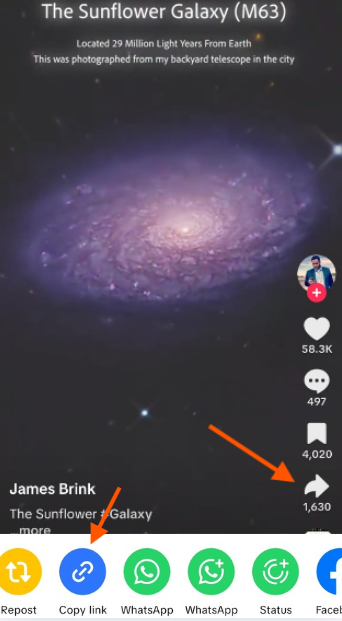
📋 Step 1: Copy the Instagram Link step
STEP 02

🔗 Step 2: Paste the Link

Paste the copied link into our Instagram Thumbnail Downloader. The tool will quickly detect the available thumbnail image.
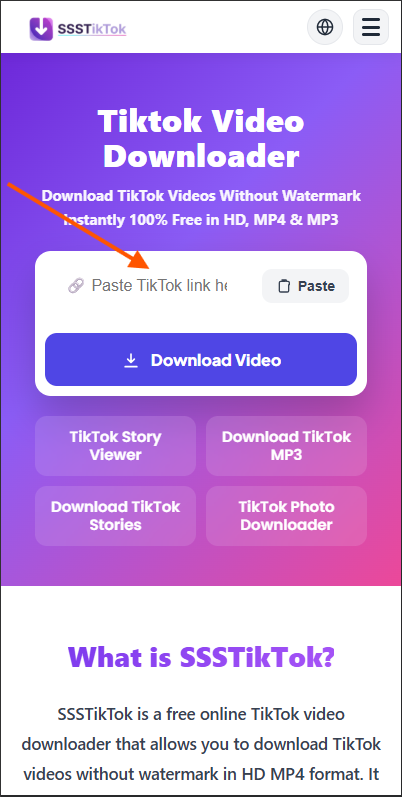
🔗 Step 2: Paste the Link step
STEP 03

⬇️ Step 3: Download the Thumbnail

Click Download to save the thumbnail image in the best available quality to your device.
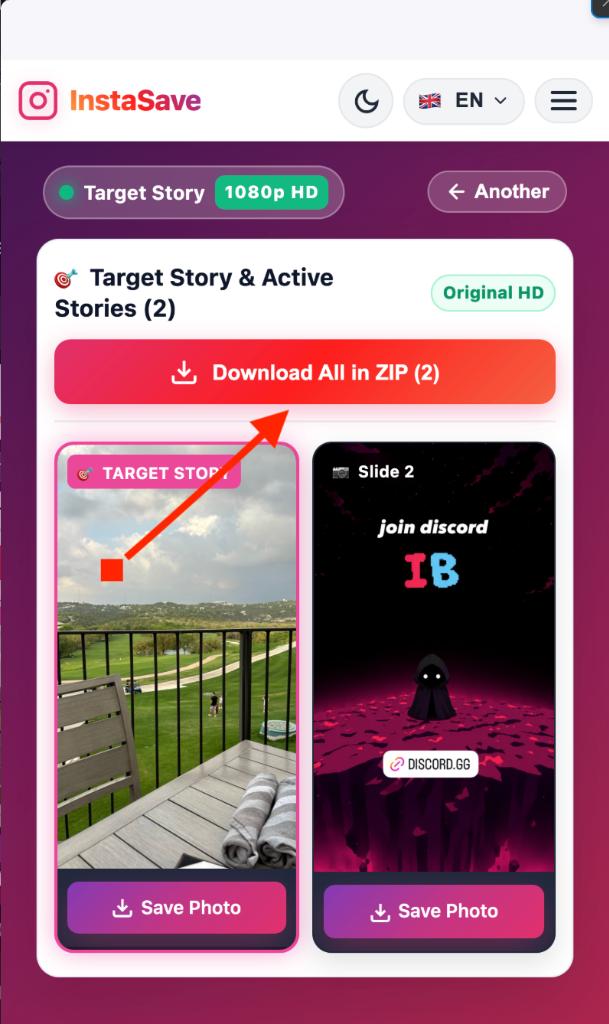
⬇️ Step 3: Download the Thumbnail step

Features of Instagram Thumbnail downloader

Everything you need for a fast and secure Instagram Thumbnail Download. Our Instagram Thumbnail Downloader helps you save thumbnail images in the best available quality with just a few clicks.

Fast Thumbnail Downloads

No one likes waiting. Our Thumbnail Downloader Instagram processes public links in seconds, so you can save thumbnail images without delays, redirects, or unnecessary steps.

📺

HD Thumbnail Quality

Every Instagram Video Thumbnail Download keeps the best quality available from the original post. Whether it's a Reel cover, video preview, or Instagram Reels Thumbnail Download, your image stays sharp and clear.

🔒

Safe & Secure

Your privacy always comes first. Our Instagram Thumbnail Downloader Online never asks for your Instagram username or password. We only process the public link you provide and never collect unnecessary personal information.

💻

Works on Every Device

Use our tool on Android, iPhone, Windows, Mac, Linux, tablets, and all major browsers. Whether you're using Chrome, Safari, Firefox, or Edge, you can download Instagram thumbnails anytime without installing extra software.

♾️

Unlimited Free Downloads

Download as many public thumbnail images as you need. There are no subscriptions, daily limits, or hidden charges, making it easy to save every Instagram Thumbnail you want.

📱

No App Required

Everything works directly from your browser. Simply paste the public Instagram link and download thumbnail from Instagram in just a few clicks no app or browser extension required.

🛡️ PRIVACY & SECURITY

Privacy & Security

No Instagram Login
No Password Required
No Download History Stored
Secure Connection

Our Instagram Thumbnail Downloader only processes the public Instagram link you provide to complete your Instagram Thumbnail Download. We never permanently store files or collect unnecessary personal information. Always download content responsibly and respect the rights of the original creator.

InstaSave vs. Competitors

FeaturesInstaSaveOthersInstagram
Direct 1080p Full HD Downloads
Clean (No Watermark on Media)
100% Anonymous Viewing & Saving
Full-Size Profile Picture (HD DP)
Story Highlights Album Downloader
Original Audio & MP3 Extraction
No Account Login Required
100% Free & Unlimited Access

Explore More Instagram Tools

Need something more than an Instagram Video Downloader? Explore our free Instagram tools to download, view, and save different types of Instagram content in just a few clicks.

🎬

Instagram Reels Downloader

Download trending reels with high quality audio in MP4 format.

Explore Tool
📖

Instagram Story Saver

Save active Instagram stories anonymously before they expire.

Explore Tool
📷

Instagram Photo Downloader

Save full resolution photos, image posts, and HD galleries.

Explore Tool
👤

Profile Picture Downloader

Download full size HD profile avatars without quality loss.

Explore Tool
🖼️

Instagram Carousel Downloader

Extract all images and video slides from carousel albums.

Explore Tool

Highlights Downloader

Save permanent story highlight albums directly to your device.

Explore Tool
🎵

Instagram Audio Downloader

Extract background songs and original voice tracks in MP3 format.

Explore Tool
📺

IGTV Video Downloader

Save long-form IGTV broadcasts and video episodes in HD.

Explore Tool
🖼️

Thumbnail Downloader

Save high-resolution video thumbnail covers without play icons.

Explore Tool
🔍

Instagram Profile Viewer

View public Instagram profiles and bios anonymously.

Explore Tool
👁️

Instagram Post Viewer

Inspect post details, captions, and media without logging in.

Explore Tool
👀

Instagram Story Viewer

Watch public stories in real time without being seen.

Explore Tool

Frequently Asked Questions

Find answers to the most common questions about using InstaSave downloader.

Copy the public Instagram post link, paste it into our Instagram Thumbnail Downloader, and click Download. Your thumbnail image will be ready in a few seconds.

Yes. Our tool supports Instagram Reels Thumbnail Download, allowing you to save public Reel cover images in the best available quality.

Yes. Our tool is completely free to use with no hidden fees, subscriptions, or download limits.

No. You don't need to sign in or share your Instagram username or password. Simply paste the public link and download.

Yes. Every Instagram Thumbnail Download is saved in the best quality available from the original Instagram post.

Yes. Our Instagram Thumbnail Downloader works on Android, iPhone, Windows, Mac, Linux, tablets, and all modern web browsers.

No. You can download unlimited public Instagram thumbnail images without restrictions.

No. For privacy reasons, our tool only supports publicly available Instagram posts.

This usually happens if the link is incorrect, the post is private, or the content has been removed. Check the link and try again.

Yes. We don't ask for your Instagram login details or store unnecessary personal information. Your privacy is always protected.

You should only download thumbnail images that you own or have permission to save. Always respect Instagram's terms and the rights of the original creator.

Your thumbnail image is usually saved to your browser's Downloads folder. On mobile devices, it may also appear in your Gallery, Photos, or Files app, depending on your device settings.